
Scarlet Skips one button
Scarlet Skips one button play is the entire loop. Steam's about text says you time every skip with press, hold, and release on a single button. There is no second action listed for jump, dash, or rope swing. You charge the skip, keep the input down, then release so Scarlet clears the rope in a park that still looks like a neighborhood lawn. Official screenshot 0 shows that scene with score 23 and a pink meter on the right. Keyboard-only and mouse-only options are Steam categories, so you can stay on one device. Partial controller support is listed beside them. The rest of this overview is that timing job: how the store describes the input, what the HUD shows while you skip, and how a miss ends a run before upgrades ever appear.
How press, hold, and release time a skip
Press starts the charge. Hold keeps Scarlet loading the jump. Release is the leap. Steam does not print a frame window or a meter label for that charge, but the about text is explicit that the whole game uses those three beats on one button. That is why Steam does not list WASD, a dedicated jump key, or a rope-swing modifier. If you can click or tap one control, you can enter a run. Keyboard Only Option and Mouse Only Option are separate Steam flags, which means the store claims you can play without mixing a keyboard and a mouse. Partial Controller Support is a third flag; it is not Full Controller Support, so a pad is allowed without a promise that every prompt is written for it.
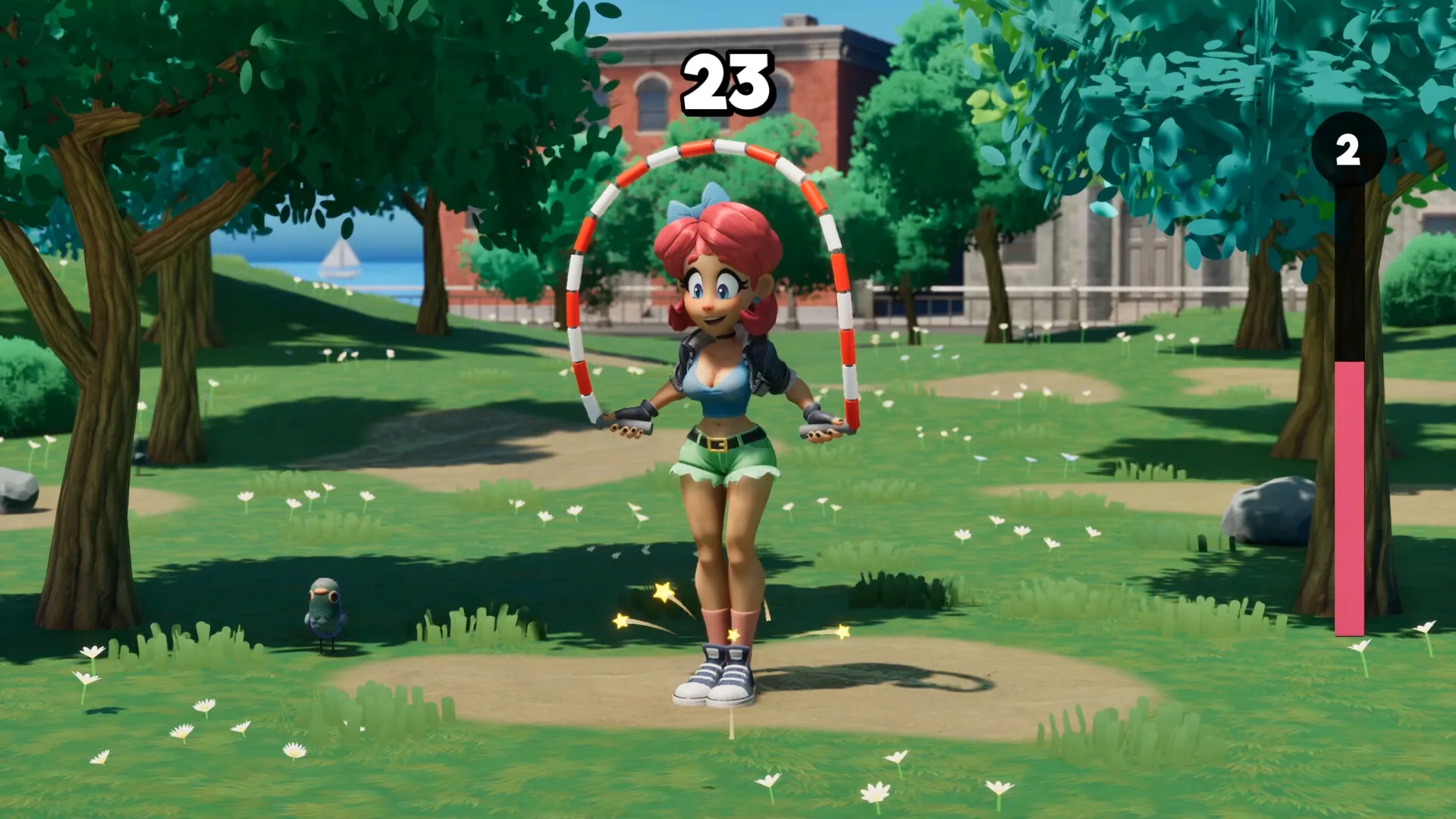
A practical way to learn the beat is to watch the park screenshot while you try the demo of the motion in your head: Scarlet's rope is already circling, the skip count sits large in the HUD, and the pink meter on the right is the level track that later opens the three-card overlay. Fail the timing and the run is over. The public achievement Off to a Great Start is described as Die on the first jump, which tells you the first skip can kill the run before any upgrade appears. That is the one-button lesson in one line: miss early and you never see Reinforce Jump Rope.
Skip-count HUD and the pink level meter
Official screenshots print a large skip count in the playfield and a vertical pink meter on the right. Screenshot 0 is score 23 at what looks like a level-2 fill. Screenshot 3 is score 13 on a similar park beat. Screenshot 6 is a closer pose at 24. Those numbers are skip counts, not a hidden currency. Steam copy talks about chasing high scores, and the HUD is the score. The pink meter is the level track that fills as you keep skipping; when it completes, Steam's upgrade copy says you pick 1 of 3 random cards.
Because the HUD is visible in stills, you can read a run without a tooltip overlay. A low number with a short meter is an early park skip. A later still with jet sneakers and score 65 (on the Screenshots page) is a stacked build, not a different control scheme. The button never changes. Only the cards change how far a release sends Scarlet. Keep that split in mind: One button is the input, Upgrade cards is the overlay, High scores is what a long HUD number looks like when shoes and fire get involved.
Keyboard, mouse, and partial controller flags
Steam lists Keyboard Only Option, Mouse Only Option, and Partial Controller Support on the same category row as Single-player and Family Sharing. Those flags are store metadata, not an in-game settings screenshot. They still matter before you buy: you can plan a laptop session with one key, or a mouse-only session, without needing a second device. Partial controller support is the cautious flag. It is enough to try a pad, and not enough to assume Steam Input glyphs for every prompt.
The game is English only on the storefront. Button prompts in stills are not localized. There is no listed gyro, touch, or Steam Deck verification line among the Steam categories. Windows is the only platform flag; mac and Linux are false. If you want the full SKU table, open Windows Steam. If you want to see the same park skip from another angle, the FAQ restates the one-button rule in short answers, and the Launch Trailer on the home page is the first-party motion reference. Press starts the charge. Hold keeps the jump loading. Release is the leap over a rope that already circles in the park stills. A pink meter on the right fills toward the three-card overlay. Fail the first skip and Off to a Great Start can unlock before you ever see Increase Luck. Score 23 in screenshot 0 is a clean park count. Score 13 in screenshot 3 is an earlier beat on the same lawn. Neither still needs a second button.
When a mistimed skip ends the run
Steam does not publish a combo chart. The stills plus the achievement text are the evidence for failure. Off to a Great Start unlocks for dying on the first jump, and 79.1% of players had it on the public achievements page. That global rate says a lot of runs die before the first level-up. Treat the first skip as a real check. Hold long enough to clear the rope. Release on the beat you can see in the park stills.
Later stills show fire on the rope and flames on the sneakers. Those are upgrade results, not extra buttons. The control stays one input. If a clip from Yerk shows Scarlet launching far above the park, that is stacked jump height or Super Rocket Shoes, still fired by the same release. Read Upgrade cards next if you want the overlay names, or High scores if you want the Outer Space clip that follows a long climb. Keyboard-only play means you can bind a single key and never touch the mouse. Mouse-only play means a click-and-hold is enough. Partial controller support lets you try a pad without promising Steam Input glyphs on every prompt. The park still at score 23 is the cleanest view of that single-control loop before shoes and fire enter the picture.
Sources
Steam AppDetails for Scarlet Skips ↗
Scarlet Skips on Steam ↗